Tekmate Redesign
Tekmate Redesign
ROLE
ROLE
DURATION
2 Months
SKILLS
Sole Designer and Researcher
Sole Designer and Researcher
DURATION
2 Months
SKILLS
UX/UI Design, Design Systems, Usability Testing
UX/UI Design, Design Systems, Usability Testing
PROBLEM BRIEF
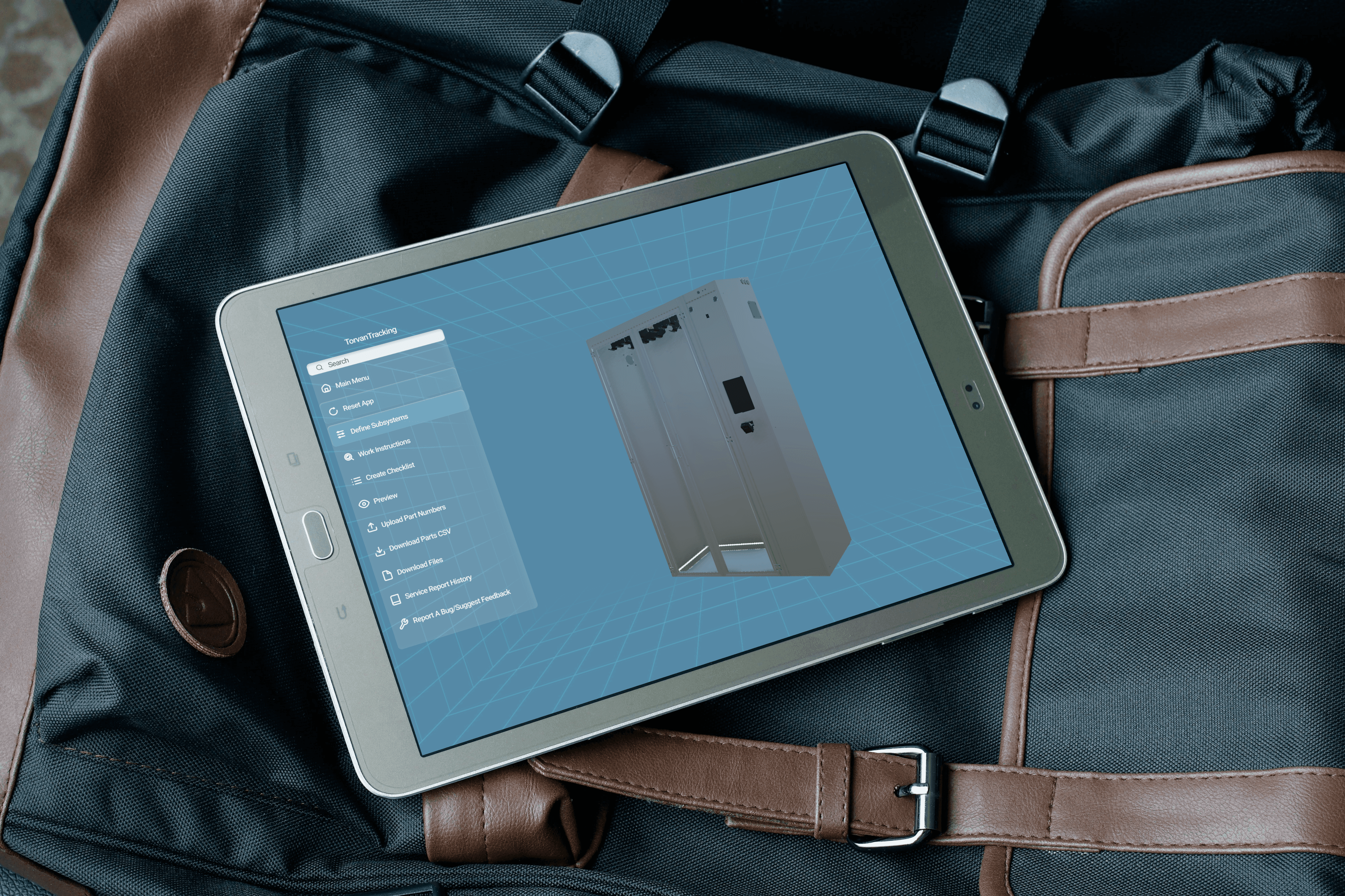
Tekmate is a field service system for desktops and tablets that transforms manual service work on to a fully digital on-site system. Despite boosting efficiency, communication, and workflow management, its user experience and visual design limit its overall appeal and usability. A comprehensive redesign is needed to create a more intuitive and engaging experience that better meets the needs of field service professionals.
PROBLEM BRIEF
Tekmate is a field service system for desktops and tablets that transforms manual service work on to a fully digital on-site system. Despite boosting efficiency, communication, and workflow management, its user experience and visual design limit its overall appeal and usability. A comprehensive redesign is needed to create a more intuitive and engaging experience that better meets the needs of field service professionals.
GOAL
Analyze the visual design and usability of the software Tekmate to create a redesign that boosts visual and system improvement for both technicians and editors.
GOAL
Analyze the visual design and usability of the software Tekmate to create a redesign that boosts visual and system improvement for both technicians and editors.
OVERVIEW
The Tekmate platform is an on-site field service system designed for entire teams to streamline and manage service and maintenance operations. The platform connects editors and technicians through a centralized digital workflow.
Editors can create guided step-by-step 3D workflows, insert diagrams and videos, while technicians can access built-in checklists, submit reports, and generate documentation directly on-site. By bringing these tools together in one platform, Tekmate enables faster, more secure, and more efficient maintenance while keeping teams consistently informed and connected throughout the service process.
OVERVIEW
The Royal Bank of Canada (RBC) is Canada’s largest bank with over 20 million clients and facilitates personal and commercial banking as well as other financial services such as insurance, wealth management etc. Moneris is partially owned by RBC and is Canada’s largest payment processor.
Tap to Pay (TTP) on the Moneris Go App is a form of payment processing that enables a business to accept contactless card-based payments via a mobile device. TTP involves no physical payment terminal and is a highly viable option for many merchants. Currently, the Mobile POS Payments market is projected to reach US$12.56tn in 2025 and smart terminals account for 62.70% of in-person transactions.
USER RESEARCH
My project began by putting myself in the shoes of users by role playing as a technician and editor using the software. As a technician I tested various different models, tutorials, submitted reports and mimicked what it would be like to follow the tutorials while handling real equipment. As a editor I tested all features including creating tutorials and setting up systems.
I presented my findings in a written analysis of every feature functionally and visually. The full analysis can be viewed through this button:
USER RESEARCH
My project began by putting myself in the shoes of users by role playing as a technician and editor using the software. As a technician I tested various different models, tutorials, submitted reports and mimicked what it would be like to follow the tutorials while handling real equipment. As a editor I tested all features including creating tutorials and setting up systems.
I presented my findings in a written analysis of every feature functionally and visually. The full analysis can be viewed through this button:
USER RESEARCH
My project began by putting myself in the shoes of users by role playing as a technician and editor using the software. As a technician I tested various different models, tutorials, submitted reports and mimicked what it would be like to follow the tutorials while handling real equipment. As a editor I tested all features including creating tutorials and setting up systems.
I presented my findings in a written analysis of every feature functionally and visually. The full analysis can be viewed through this button:
Full Written Analysis
Heuristic Evaluation Overview:
Heuristic Evaluation Overview:
Hover states are needed to show selection recognition when mouse is on a part or text box
Users should be able to select multiple equipment parts to make naming much easier (e.g pump being three separate pieces in the model but only one in function)
Show users cursor in text boxes or change colours of boxes to show that it has been selected and they can type
No status update as to if their checklist and info has been saved
Show status updating popup to show recognition of filled out information
Hover states are needed to show selection recognition when mouse is on a part or text box
Users should be able to select multiple equipment parts to make naming much easier (e.g pump being three separate pieces in the model but only one in function)
Show users cursor in text boxes or change colours of boxes to show that it has been selected and they can type
No status update as to if their checklist and info has been saved
Show status updating popup to show recognition of filled out information
Hover states are needed to show selection recognition when mouse is on a part or text box
Users should be able to select multiple equipment parts to make naming much easier (e.g pump being three separate pieces in the model but only one in function)
Show users cursor in text boxes or change colours of boxes to show that it has been selected and they can type
No status update as to if their checklist and info has been saved
Show status updating popup to show recognition of filled out information
IDEATION
I then began to plan the new look for the platform. Key features I looked at were wording, style consistency and visual appeal. This process involved, sketching, wireframing, and Figma prototyping. Below is the model selection as an example:
IDEATION
I then began to plan the new look for the platform. Key features I looked at were wording, style consistency and visual appeal. This process involved, sketching, wireframing, and Figma prototyping. Below is the model selection as an example:
IDEATION
I then began to plan the new look for the platform. Key features I looked at were wording, style consistency and visual appeal. This process involved, sketching, wireframing, and Figma prototyping. Below is the model selection as an example:
Model Selection Redesign Process:
Model Selection Redesign Process:

From this, I presented my full redesign that can be viewed using the button below:
From this, I presented my full redesign that can be viewed using the button below:
Full Visual Analysis
Selection of Updated Designs and New Features:
Selection of Updated Designs and New Features:
FEEDBACK
Once these changes were implemented on the platform user testing was conducted with Atteria, a company responsible for setting up tutorials and maintenance tasks for technicians. We were given three notes on what needed to be further improved. specifically with creating work instructions (tutorials) the distinguishing feature of Tekmate.
FEEDBACK
Once these changes were implemented on the platform user testing was conducted with Atteria, a company responsible for setting up tutorials and maintenance tasks for technicians. We were given three notes on what needed to be further improved. specifically with creating work instructions (tutorials) the distinguishing feature of Tekmate.
FEEDBACK
Once these changes were implemented on the platform user testing was conducted with Atteria, a company responsible for setting up tutorials and maintenance tasks for technicians. We were given three notes on what needed to be further improved. specifically with creating work instructions (tutorials) the distinguishing feature of Tekmate.
Issue 1: Instruction Customization
Issue 2: Instruction Categorization
Issue 3: Instruction Menu
Issue 1: Instruction Customization
Issue 2: Instruction Categorization
Issue 3: Instruction Menu
IMPLEMENTATION
In order to incorporate these changes and problem solve how to integrate them, I started by sketching out how to solve all three of these problems
IMPLEMENTATION
In order to incorporate these changes and problem solve how to integrate them, I started by sketching out how to solve all three of these problems
IMPLEMENTATION
In order to incorporate these changes and problem solve how to integrate them, I started by sketching out how to solve all three of these problems

I moved on to prototyping these changes to visualize their implementation for the programmers.
Click the image below to view the added features:
I moved on to prototyping these changes to visualize their implementation for the programmers.
Click the image below to view the added features:


FINAL
With the conclusion of the project a portion of my designs were approved and implemented into the platform. Among the added features were my style guide, side menu design, side panel design and visibility mode to name a few. While the platform is still currently being developed, the examples below showcase how my design work was incorporated into the final product.
FINAL
With the conclusion of the project a portion of my designs were approved and implemented into the platform. Among the added features were my style guide, side menu design, side panel design and visibility mode to name a few. While the platform is still currently being developed, the examples below showcase how my design work was incorporated into the final product.
FINAL
With the conclusion of the project a portion of my designs were approved and implemented into the platform. Among the added features were my style guide, side menu design, side panel design and visibility mode to name a few. While the platform is still currently being developed, the examples below showcase how my design work was incorporated into the final product.


OUTCOME
Through this redesign project the platform become easier and more efficient for technicians and editors to navigate. Usability testing showed a 20–30% improvement in task success and ease of use, while iterative UI improvements increased instruction customization and accuracy by 50%. The project also strengthened the value proposition and positioning of Tekmate by establishing a more focused feature set by enhancing functionality and prioritizing features based on user needs and testing insights..
OUTCOME
Through this redesign project the platform become easier and more efficient for technicians and editors to navigate. Usability testing showed a 20–30% improvement in task success and ease of use, while iterative UI improvements increased instruction customization and accuracy by 50%. The project also strengthened the value proposition and positioning of Tekmate by establishing a more focused feature set by enhancing functionality and prioritizing features based on user needs and testing insights.
REFLECTION
This project was my first professional design experience, and it gave me valuable insight into professional work environments, workflows, and collaboration. It allowed me to apply the design techniques and practices I had learned in school to a real-world project. Throughout the process, I continuously worked on communicating and presenting my design ideas clearly while becoming more comfortable with iteration, feedback, and revisiting my work to make improvements.
One of the most rewarding aspects of the project was seeing my work actually implemented into the platform. I had the opportunity to make changes in real time and communicate directly with programmers about how the designs should be displayed and function. This was an important learning experience because it was my first time moving beyond conceptual design and seeing my work become part of an actual product.
REFLECTION
This project was my first professional design experience, and it gave me valuable insight into professional work environments, workflows, and collaboration. It allowed me to apply the design techniques and practices I had learned in school to a real-world project. Throughout the process, I continuously worked on communicating and presenting my design ideas clearly while becoming more comfortable with iteration, feedback, and revisiting my work to make improvements.
One of the most rewarding aspects of the project was seeing my work actually implemented into the platform. I had the opportunity to make changes in real time and communicate directly with programmers about how the designs should be displayed and function. This was an important learning experience because it was my first time moving beyond conceptual design and seeing my work become part of an actual product.
NEXT STEPS
During this project I also worked on a mobile version of the platform which was yet to be made. However, the mobile version was supplementary and largely conceptual so if I were to revisit the platform I would like to actualize a mobile version as I feel a more portable version would further expand the user base and clients for Tekmate.
NEXT STEPS
During this project I also worked on a mobile version of the platform which was yet to be made. However, the mobile version was supplementary and largely conceptual so if I were to revisit the platform I would like to actualize a mobile version as I feel a more portable version would further expand the user base and clients for Tekmate.